Skip to content

Library

Every beat, one search away.

A beat organizer and sample library in the cloud. Upload your beats, loops and samples, then find the right sound by tempo, feel, genre and who it’s for.
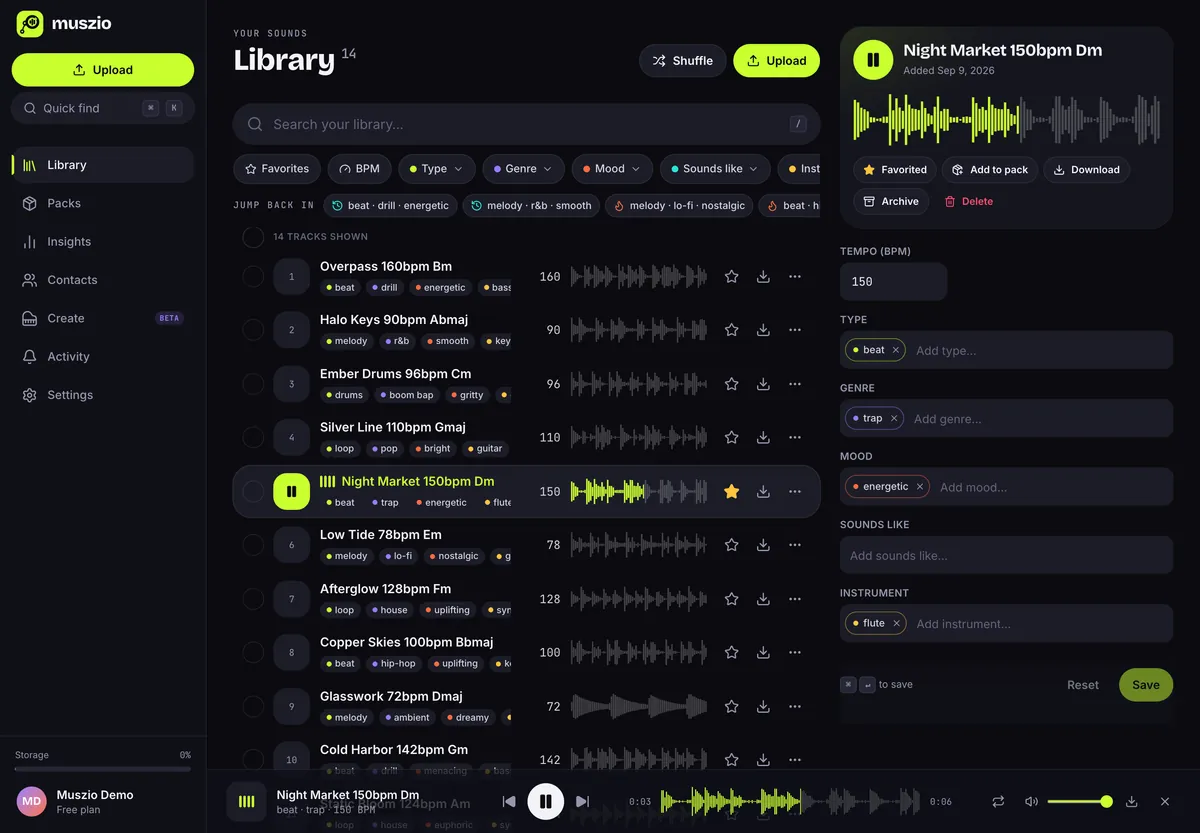
The Muszio library on desktop: a list of tracks with colored tags, BPM, waveforms and favorites, and an inspector for editing the playing track's tempo and tags.

01Organize

Tags that mean something to you.

Each tag category has its own color in the list, the filters and on shared pack pages, so you can read a track at a glance.

Type · beat, loop, melodyGenre · trap, lo-fi, houseMood · dark, warm, euphoricSounds like · who it fitsInstrument · keys, guitar, 808

Tempo from file names

Name it “Cold Harbor 142bpm Gm” and it’s filed at 142 BPM. Set it for one track in the inspector, or for a whole selection at once.

Bulk editing

Select a run of tracks and add or replace tags, or set their tempo, all at once. Suggestions help you keep tag names consistent.

Favorites and history

Star your best work, and get back to recent tag combinations from Jump back in with one click.

Folder uploads

Drop files or entire folders. Several transfers run at once, and each track appears as soon as it’s ready.

Waveforms everywhere

Your browser draws each waveform, so you can see a loop’s shape and scrub straight to the drop.

A player that follows you

Playback keeps going as you move between your library, packs and insights, and works with your keyboard’s media keys.

02Find

Stack filters until only the right one is left.

Pick a tempo range, a type and a mood. Tags in the same category widen the search; different categories narrow it down. Try it on this example library.
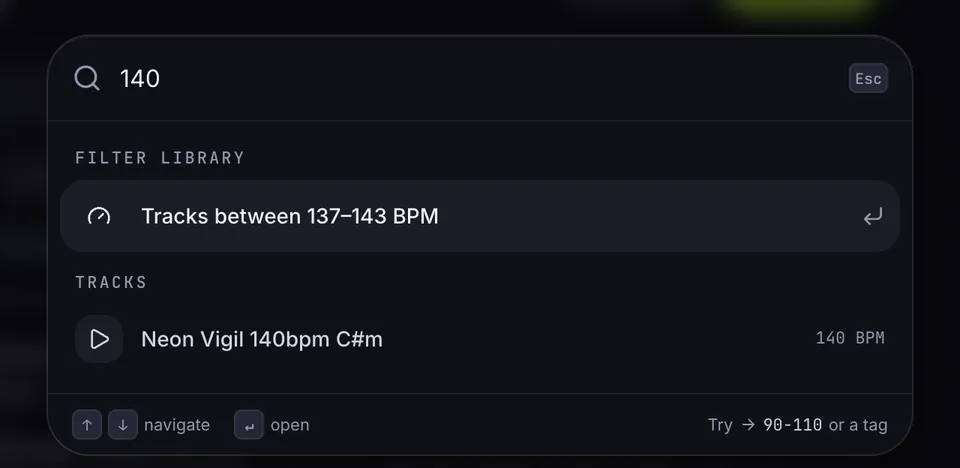
Quick find with 140 typed: it offers to filter the library to tracks between 137 and 143 BPM and lists Neon Vigil 140bpm.

Quick find also understands tempo: type 140 for nearby tempos or 90-110 for a range.

Example library

14 of 14 tracks

BPM
Type
Genre
Mood
  • Glasswork 72bpm Dmaj

    melodyambientdreamyguitar

    Tempo 72 BPM

  • Low Tide 78bpm Em

    melodylo-finostalgicguitar

    Tempo 78 BPM

  • Paper Lanterns 86bpm Fmaj

    looplo-fichillpiano

    Tempo 86 BPM

  • Halo Keys 90bpm Abmaj

    melodyr&bsmoothkeys

    Tempo 90 BPM

  • ★Velvet Hours 94bpm Ebm

    beatr&bwarmkeys

    Tempo 94 BPM

  • Ember Drums 96bpm Cm

    drumsboom bapgrittydrums

    Tempo 96 BPM

  • Copper Skies 100bpm Bbmaj

    beathip-hopupliftingkeys

    Tempo 100 BPM

  • Silver Line 110bpm Gmaj

    looppopbrightguitar

    Tempo 110 BPM

  • Static Bloom 124bpm Am

    loophouseeuphoricsynth

    Tempo 124 BPM

  • Afterglow 128bpm Fm

    loophouseupliftingsynth

    Tempo 128 BPM

  • ★Neon Vigil 140bpm C#m

    beattrapdarksynth

    Tempo 140 BPM

  • Cold Harbor 142bpm Gm

    beatdrillmenacingbass

    Tempo 142 BPM

  • ★Night Market 150bpm Dm

    beattrapenergeticflute

    Tempo 150 BPM

  • Overpass 160bpm Bm

    beatdrillenergeticbass

    Tempo 160 BPM

Synthetic tracks from a local demo account, filtered here in your browser. In the app, filters and search run against your whole library.

03Keyboard

Hands on the keys, ears on the music.

Move through the list, audition, favorite and tag without touching the mouse.

⌘K
Quick find: names, tags, a tempo or a BPM range
/
Search the library
JK
Move down and up the list
↵
Play the selected track
F
Favorite
E
Edit tags and tempo
X
Select (hold ⇧ for a range)
Space
Play or pause
⇧← →
Previous or next track
,.
Seek

Library questions

Does Muszio detect BPM from the audio?
Muszio reads tempo from file names, so “Night Market 150bpm Dm.wav” is filed at 150 BPM. You can set or correct the tempo of any track in the inspector, or of a whole selection from the bulk editor.
Which files can I upload?
Audio files up to 1 GB each, one at a time or as whole folders. Waveforms are drawn by your browser; if it can’t decode a format, the file still uploads without a waveform.
What does “Sounds like” mean?
It’s a tag category for the artists or references a beat fits, so you can pull up everything that suits a particular artist when they ask.
Is my library private?
Yes. Your library is only visible to you. Listeners only see tracks you put in a pack and share.

Stop scrolling through folders.

Bring your beats into Muszio. The free plan includes every feature and 10 GB of storage. No card needed to sign up.