Skip to content

Experimental · Beta

Create

Sketch beats right next to your library.

A free online beat maker next to your sample library. Program drums, play keys and work with your own samples in the browser, then export a WAV or save it to Muszio. Your draft stays on your device.
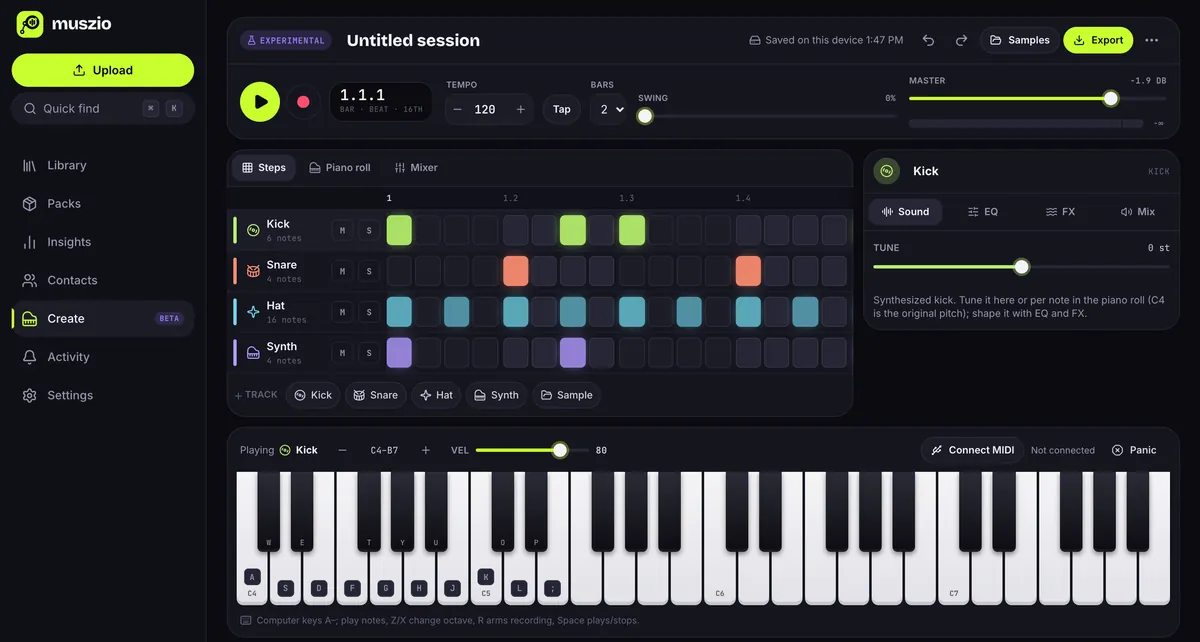
Create with the demo groove loaded: a play button, tempo 120 and two bars, a step sequencer with kick, snare, hat and synth patterns, the kick's tuning in the side panel and an on-screen piano keyboard mapped to computer keys.

01The idea

From library sample to loop in minutes.

Create sits inside Muszio, so the sounds you’ve already organized are a search away.

Start from a groove

Load the demo groove, built from sounds synthesized in your browser, or start from an empty pattern.

Bring in your sounds

Search your library or drop a file onto the workspace to make a sample track. Trim it, loop it and pitch it.

Play it in

Record from your computer keyboard or a MIDI keyboard, quantized to sixteenth notes.

What’s in this version

  • Loops of 1 to 8 bars in 4/4, with tempo, tap tempo and swing
  • Up to 12 tracks: kick, snare, hat, a basic synth and samples
  • Step sequencer and piano roll with note length and velocity
  • Samples from your Muszio library or files on your device, with trim, looping and pitch
  • Mute, solo, pan and level, three-band EQ, tempo-synced delay and reverb
  • Play with your computer keyboard, the on-screen keys or a MIDI keyboard
  • Undo and redo, and a draft that saves itself on this device
  • Export a WAV, or save the bounce straight into your library

Not in this version

Create is an experiment with a deliberately small scope.

  • Song arrangement or automation lanes
  • Microphone recording
  • Plugins (VST/AU)
  • Time-stretching: changing a sample’s pitch also changes its length
  • Cloud sync of drafts between devices

Keys while you work

Space playA–; notesZX octaveR record⌘Z undo

Create questions

Where are my drafts stored?
In this browser on this device, tied to your account. They aren’t backed up to Muszio, and clearing site data or browser storage limits can remove them. Export a WAV or save to your library to keep a copy.
Is anything uploaded while I work?
No. Library samples you choose are downloaded to your browser, and only an explicit Save to library uploads the rendered audio, which then counts toward your storage like any other upload.
Which browsers does it work in?
It’s built on standard Web Audio, so a current desktop browser gives the best experience; phones get a simplified layout. MIDI keyboards need a browser with Web MIDI support and your permission.
Will it replace my DAW?
No, and it isn’t meant to. Create is for catching an idea, building a loop from your own samples, or bouncing a quick reference.

Catch the idea before it’s gone.

Bring your beats into Muszio. The free plan includes every feature and 10 GB of storage. No card needed to sign up.